

How To Add Tasting Table As A Preferred Source On Google

In August 2025, Google rolled out the Preferred Sources feature, which lets users see their favorite news sources up front. As you may know, searching Google for any topical news story yields a "Top Stories" overview — and now, users can fully customize their news experience and cut through the noise. Whether it's sports, hard news, or the culinary world (that's why you're here, right?), no more sifting through a sea of overwhelming news sources! Want to stay up to date on the latest happenings in food? Worried about the latest Salmonella outbreak and want to keep your family safe?
With Google's handy feature, you can now set Tasting Table as a Preferred Source. As a premier leader in the food and drink space, Tasting Table delivers readers with pertinent news updates (like Trader Joe's dropping this new mini sheet cake), kitchen trends on the way out in 2026, and even cultural touchstones like the 15 essential words and phrases to know at Filipino restaurants to assist with your food adventures. And the best part? It's super easy to set Tasting Table as a Preferred Source!
Two ways to add Tasting Table as a Preferred Source on Google

Ready to prioritize all your favorite foodie scoops, trends, and everything in between? Setting Tasting Table as a Preferred Source on Google can be achieved in two ways. Upon searching for the latest food news — like Spring & Mulberry's chocolate recall due to possible Salmonella – you'll be greeted with a "Top Stories" overview, which you'll see in the screenshot below. See that little icon that looks like two cards with a star in the middle? Click that and search for either "tastingtable.com" or "tastingtable" (as seen in the screenshot above); once our website pops up, simply check the box on the right and hit "Reload results." It's that easy!
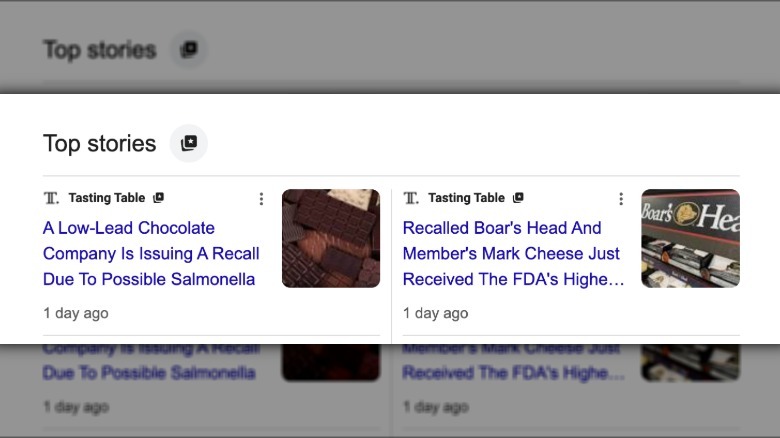 Static Media/Google
Can't wait for the next news break to set Tasting Table as a Preferred Source? You can get ahead of the curve with the second method. Follow this link, which will automatically input Tasting Table into your Source Preferences — all you have to do is make sure the box on the right is ticked, hit "Take me to Google Search," and you're all set! No more hunting Tasting Table down for the latest food updates or constantly refreshing our homepage for the Aldi olive oil you can add to your coffee, as Google will now do the heavy lifting for you! Now, to find the best Costco hidden gems from 2025 ...